Run every job from one app. Switch on only what you use.

Scheduling, crews, quotes, invoices, projects and time tracking for service companies. Start with the core and add modules as you grow. Your crews get a phone app that works with poor signal.

14 days free. Your card is first charged when the trial ends; cancel any time before.

Build yours

Tap a block to switch it on. The price is what the app would bill.

Core, always on$39Jobs, customers, scheduling, crews, time, receipts, staff and the crew app, with 2 office and 3 crew users.

$86 a month or $860 a year

Starter covers all of this for $79 a month, with 3 office and 5 crew users.

Start free trial
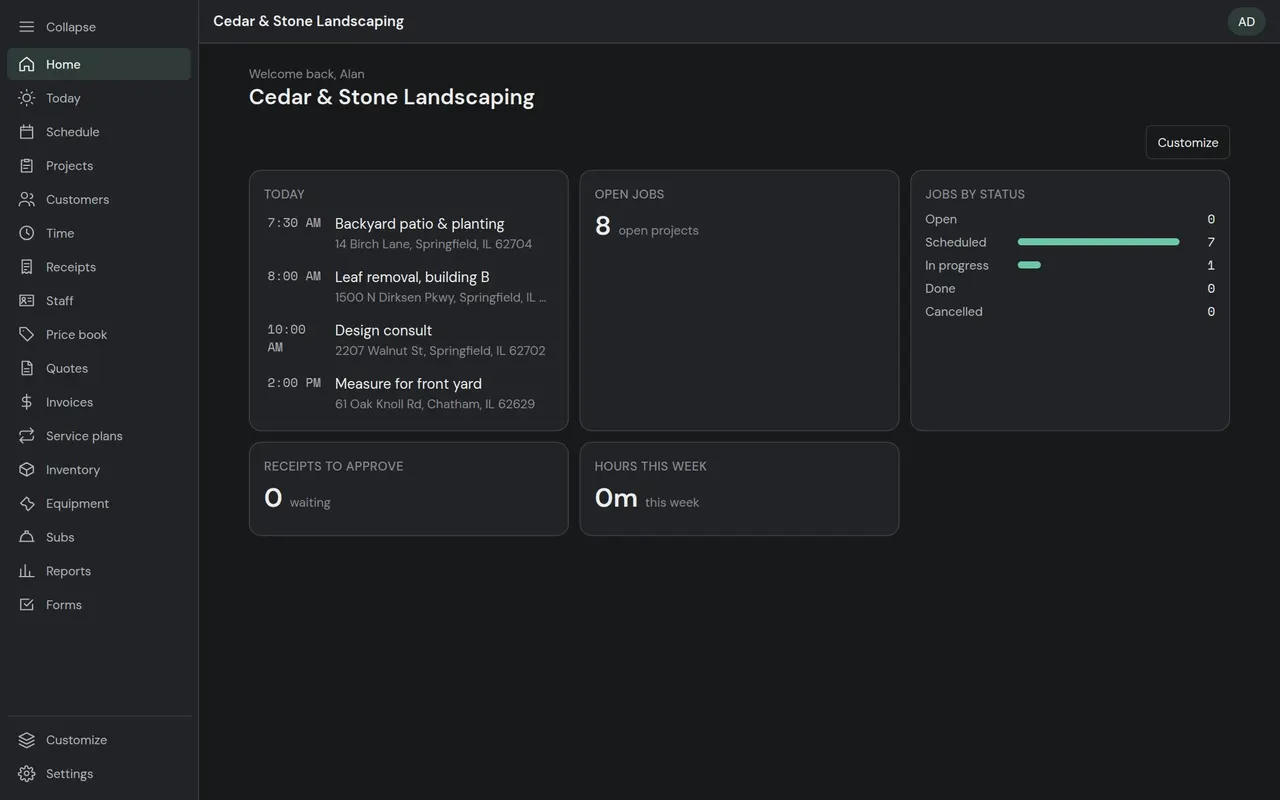
The Home page: today's visits, open jobs, jobs by status, receipts waiting and hours this week.

The core every service company runs on

Each company gets its own walled-off workspace, its own words for things, and only the screens it has switched on.

Dashboard
Today's visits, open jobs, jobs by status, receipts waiting and hours this week. Each person arranges their own.
Jobs
Statuses and steps per job type, checklists, notes, photos, signatures and custom fields.
Customers & sites
People and companies, several properties each, with access notes and one-tap Navigate and Call.
Scheduling
Day and week calendars, dispatcher boards, crews, repeating visits and route order.
Time tracking
Clock in and out from the phone, against a job or not. Managers approve timesheets.
Receipts
Snap a receipt on the job. The office approves or rejects it, and approved receipts count toward the job's costs.

Everything in the core

Start with the core. Switch on modules as you grow.

Each module is a switch in Settings. Switching one off hides it; nothing is deleted. Turn on quotes when you start quoting, projects when the jobs get bigger.

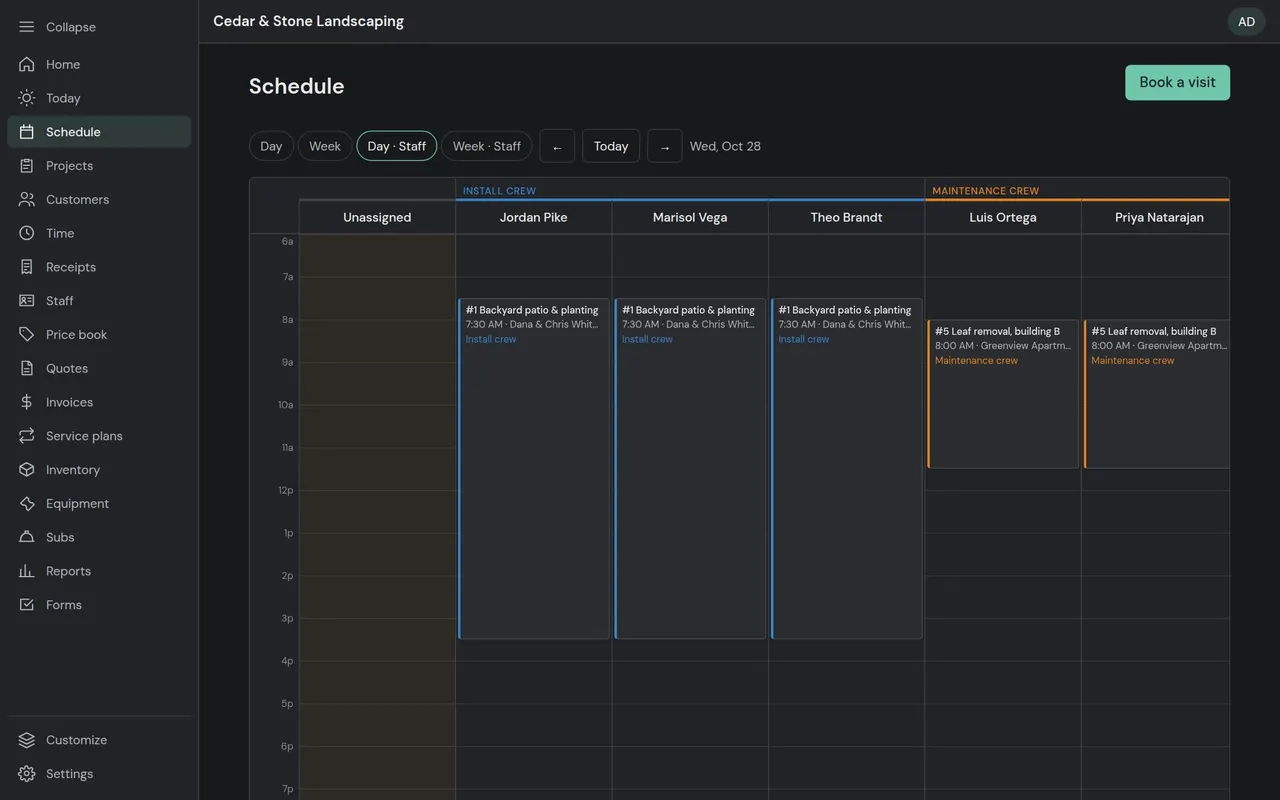
Schedule, Day · Staff: a column per person, the hours running down, unassigned work first.

Included with every company

Scheduling & dispatch

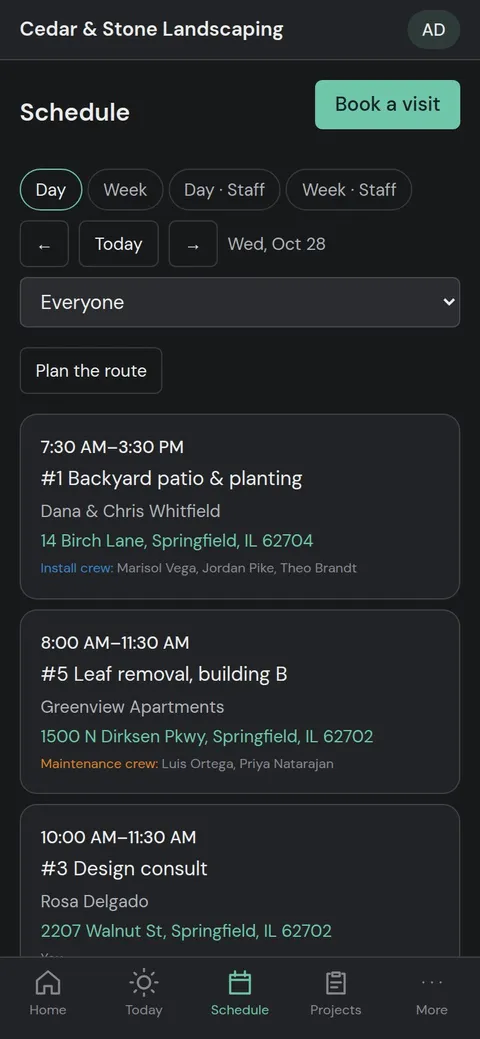
A day list on the phone, the week on a desktop, and two dispatcher boards for whoever runs the schedule.

  • Dispatcher boards. Day · Staff has a column per person and the hours running down. Week · Staff has a row per person. Unassigned work sits first.
  • Crews. Book a crew and all its members go on the visit. Change who's in the crew and its upcoming visits follow. Finished ones keep who actually went.
  • Repeating visits. Every week, every two weeks or monthly, limited to the months you work (weekly mowing April to October).
  • Route order. Each person's stops put in nearest-first order from your yard, with one tap to open the drive in Google Maps.
More about scheduling & dispatch
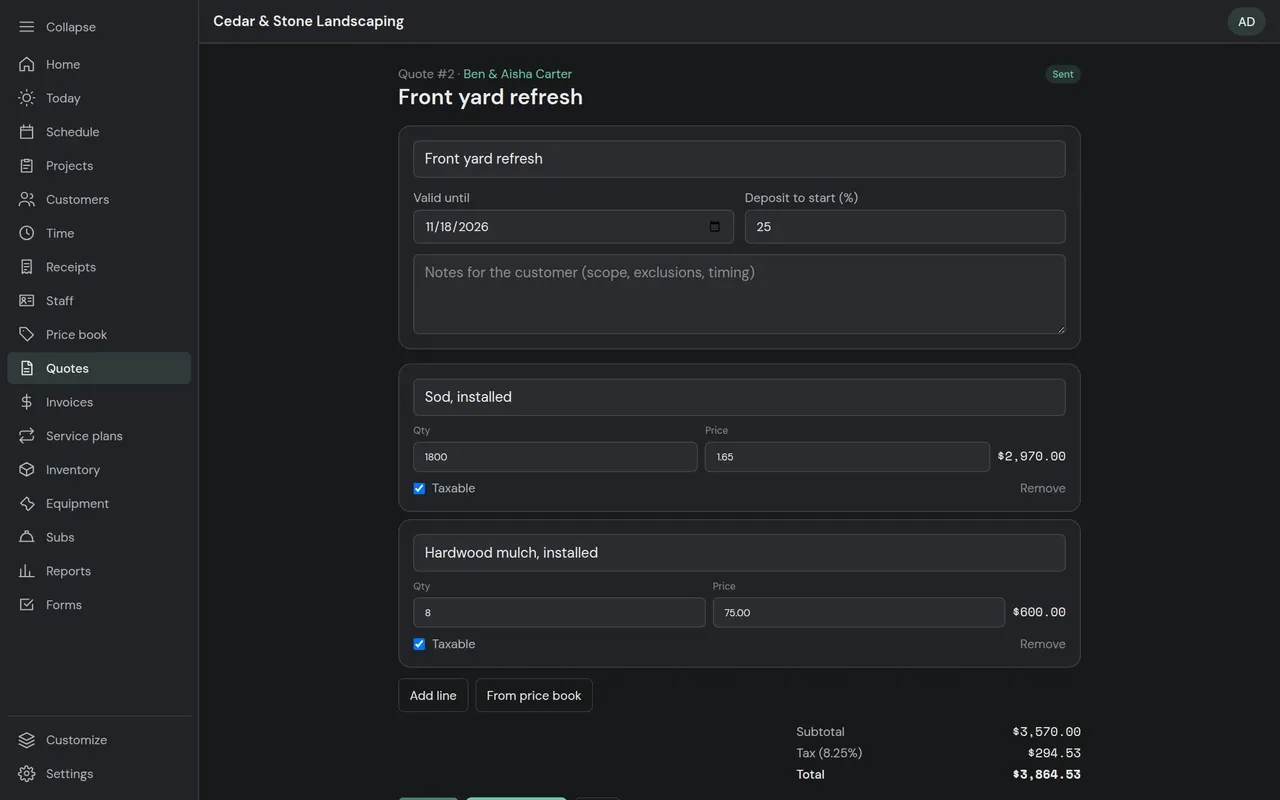
Building a quote from the price book, with tax and a deposit to start.

Add-ons: Price book & materials $9/mo, Quotes & estimates $19/mo, Invoicing $19/mo

Quotes, invoicing & payments

Quotes the customer approves on their phone, deposits and progress billing for big jobs, and every payment recorded against the right invoice.

  • Price book. Services and materials with price, cost, unit and tax setting. Pick from it on any quote or invoice.
  • Quotes. Line items, tax, a deposit percentage and a valid-until date. Send a link, and the customer approves by typing their name or declines with a reason. Branded PDF included.
  • Options and follow-ups. Good, better and best options in one quote, optional lines the customer can tick on or off, and automatic follow-ups when a quote goes unanswered.
  • Invoicing. Invoices from a job or a quote: deposit, progress percentage, then a final bill for exactly what's left. Payments by cash, check, card or bank; overpayments show as credit.
More about quotes, invoicing & payments
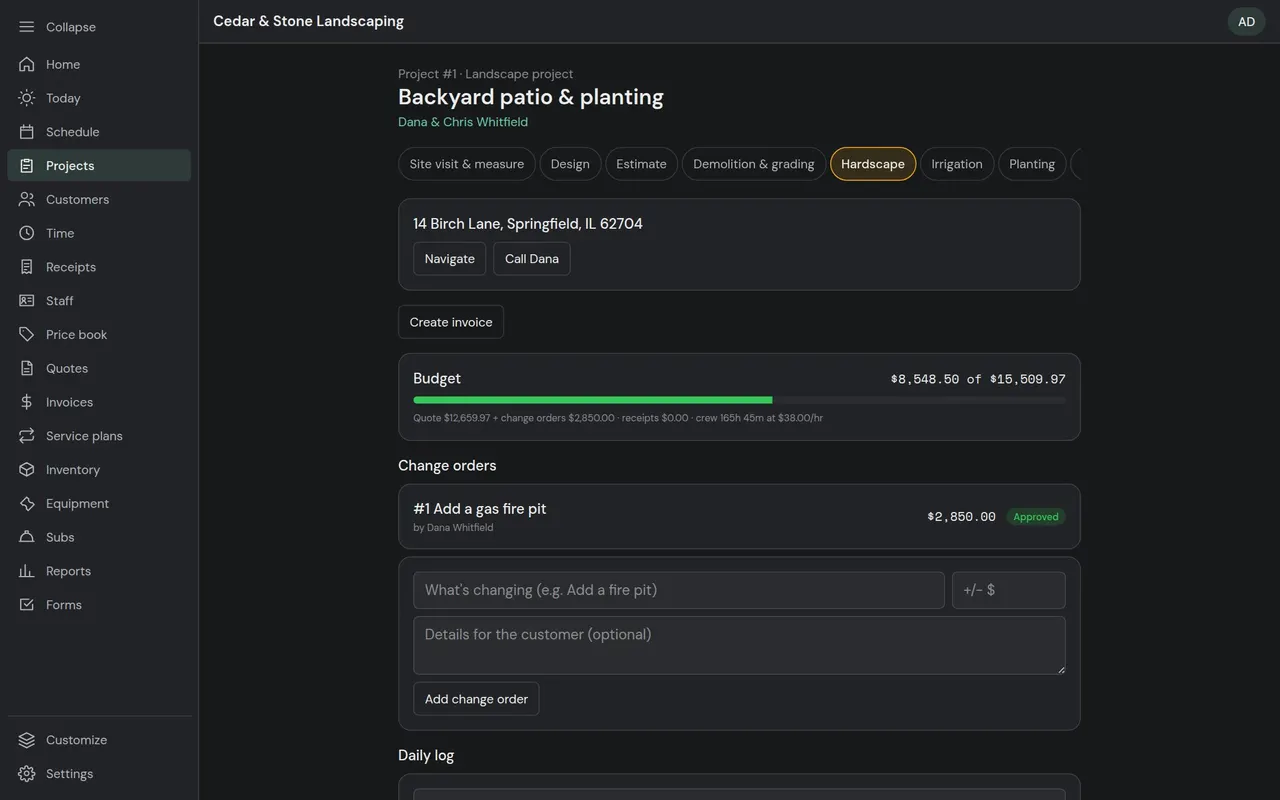
A project with its phases, budget against actual and change orders.

Add-on: Projects $39/mo

Projects

For the patio-and-planting jobs and the builds: phases, change orders, daily logs and a punch list on the job itself.

  • Phases. Move a project through its steps: site visit, design, estimate, demolition, hardscape, planting, final walk-through.
  • Change orders. Add or take away work with a price. The customer approves it online and the budget updates.
  • Budget vs actual. The approved quote plus change orders, against receipts, crew hours at your cost rate, and materials used.
  • Daily logs. What got done, crew size, hours and weather, with photos.
More about projects
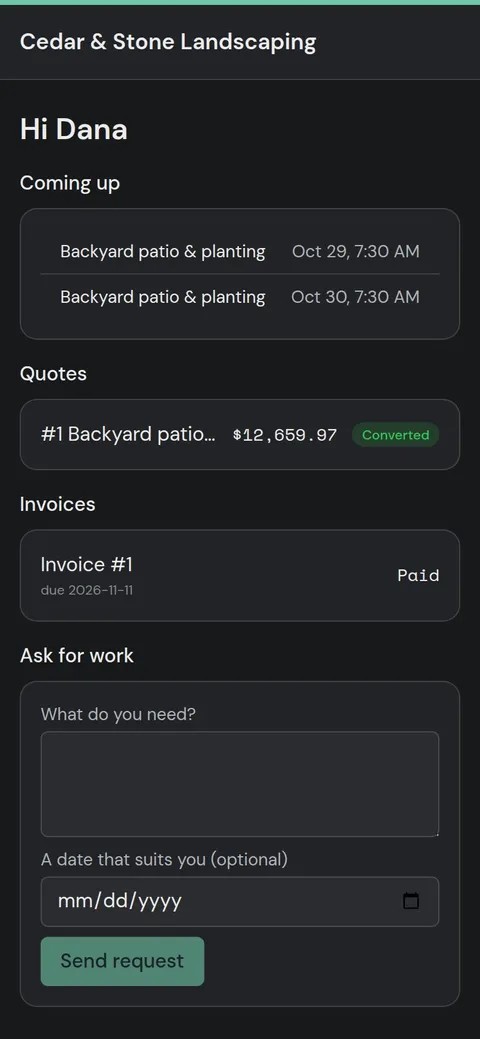
The customer portal: upcoming visits, quotes, invoices and a form to ask for more work.

Add-on: Customer portal $19/mo

Customer portal & booking

No account for the customer to make. Each page opens from a link and shows only that customer's own things.

  • Customer portal. Upcoming visits, quotes and invoices in one place, plus a form to ask for more work.
  • Quote, invoice & change order links. Approve, decline, download a PDF or pay, from any phone.
  • Online self-scheduling. Customers book open time slots themselves.
  • Website booking form. Paste one line into your website. New enquiries land as work requests, with spam and flood protection built in.
More about customer portal & booking
Properties, their units, tenants and leases, and the jobs at each one.

Add-on: Property management $25/mo

Property management

For companies that manage buildings as well as work on them: commercial, residential, apartments, mixed-use, industrial, HOA and condo, and land.

  • Properties of every kind. Residential, apartments and multifamily, commercial, mixed use, industrial, HOA and condo, and land.
  • Units, tenants and leases. Each property's units (suites, spaces or lots), who's in them and on what lease.
  • Jobs at a property. The work done at each building, in the same jobs and schedule as everything else.
  • Deal calculator. “Is this property worth buying?” Cash flow, cap rate, cash-on-cash, DSCR and a verdict.
More about property management

Built for the person in the truck

Installs to the home screen like an app. Big buttons, a bottom bar a thumb can reach, and work saved on the phone until there's signal again.

Works with poor signal
Checklist ticks, notes, photos, signatures, receipts and clock-ins wait on the phone and send themselves when signal comes back.
Today
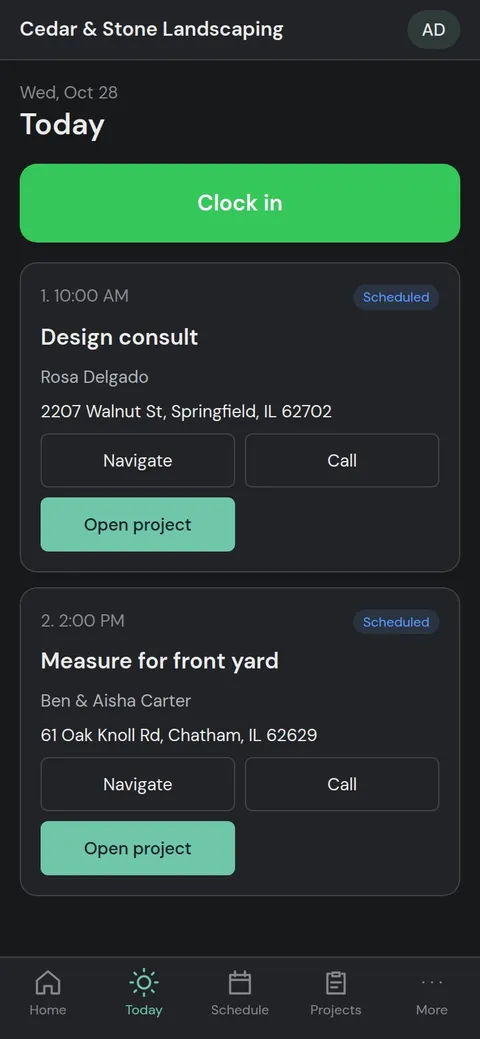
Clock in, then the day's stops in route order with Navigate, Call and the job.
Costs less per person
Crew members who just need the phone app are $8 a month each beyond your plan, against $15 for an office user.
More about the crew app
The crew app's Today screen: clock in, then the day's stops in route order.
The schedule on a phone, with the day's visits as cards.

Pay for what you use

Start with a plan, or with Core at $39 a month and only the modules you need. Pay yearly and get two months free.

Compare plans and module prices

Try it with your own jobs

Pick your trade, get its job types and checklists ready to go, and switch on only what you use.